Learning and behavior
How Learning works
Learning is how the bot turns your team's daily work into better answers. This article explains where it learns from, what happens to each thing it learns, and how to read the Learning page.
Updated October 4, 2026. Applies to the BotableX Staff Portal. For tenant admins.
Learning is how the bot turns your team’s daily work into better answers. This article explains where it learns from, what happens to each thing it learns, and how to read the Learning page.
Learning is switched off by default. If nothing is happening, that is probably why.
Before you start
- You need the Learning permission (
learning.review). - Learning is off by default for new accounts. Ask your BotableX administrator to turn it on if you want it.
- Nothing the bot learns changes its behavior until a person approves it.
Where the bot learns from
| Source | What it is |
|---|---|
| Consultation | A person typed guidance to the Bot during a conversation. The guidance is the lesson. |
| Takeover | A person took the conversation over and wrote the reply themselves. Their reply is the lesson. |
| Feedback | A customer gave a thumbs-down in the chat window and wrote why. Their reason is the lesson. |
| Conversation | Something worth keeping, drawn out of a past conversation by the nightly job. |
| Email draft edit | A person used Edit myself on an email reply. What they changed is the lesson. |
Note what is not in that list. Approving an email reply as written teaches nothing, and asking the bot for a revision teaches nothing. Only rewriting it yourself does.
What happens to each lesson
Every lesson goes down exactly one of two roads.
- A fact about your business goes into that Bot’s Learning Bank, which is a Knowledge Bank BotableX manages for it. The Bot can use it straight away.
- A behavior, meaning a rule about how to act, becomes a suggestion on Bot’s Knowledge. It does nothing until you approve it.
Before either happens, BotableX removes anything that looks like personal data, then checks whether the Bot already knows this. Things it already knows are dropped.
So where do you see all this?
- In the menu on the left, open Bot Management and click Learning.
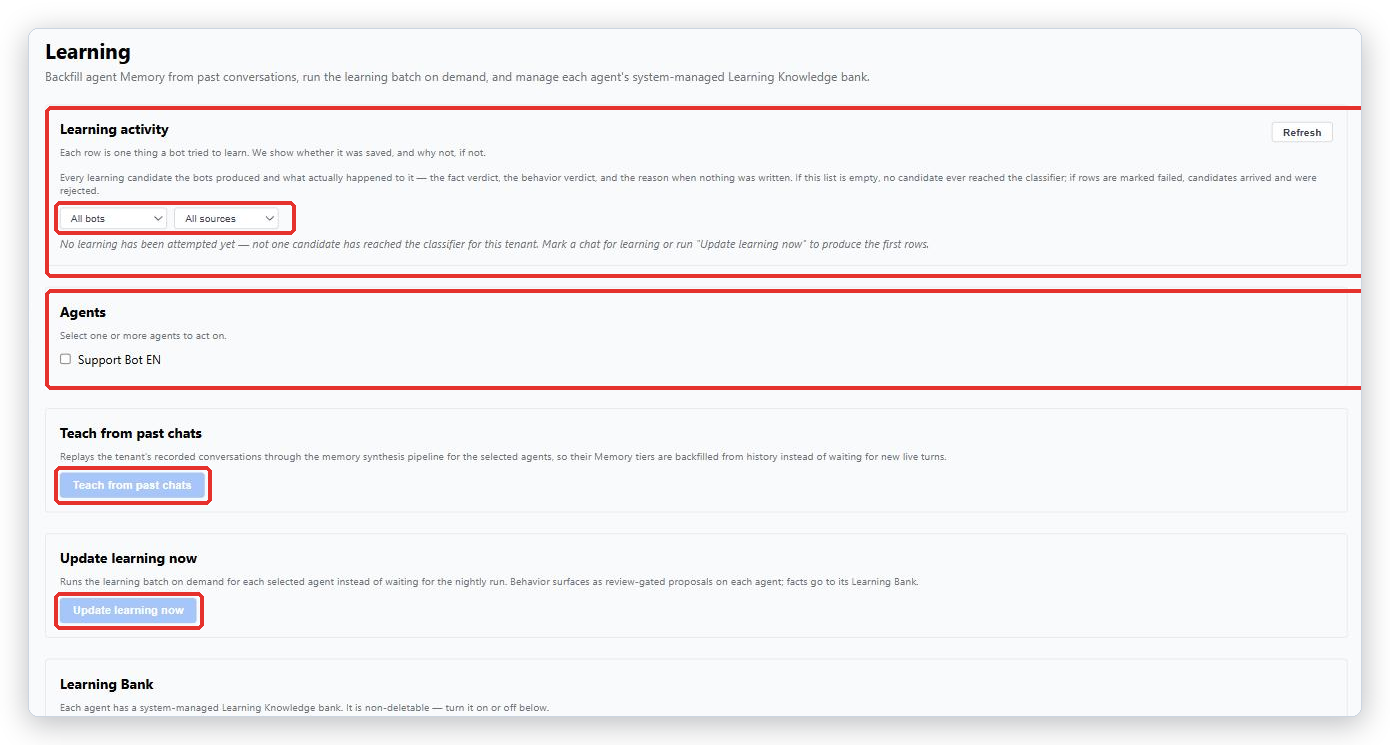
The page has several sections, stacked down the page.
- Learning activity is every lesson and what happened to it. This is the most useful part.
- Agents is where you tick which Agents the buttons below should act on. The buttons are grayed out until you tick one.
- Teach from past chats replays your old conversations so the Bot learns from history.
- Update learning now runs the learning job now instead of waiting for tonight.
- Learning Bank shows each Agent’s own learning Knowledge Bank, with an On and Off switch.
- Marked chats lists conversations your team specially tagged.
Reading the Learning activity list
Each row is one thing a Bot tried to learn. The columns are When (UTC), Source, Candidate, Fact verdict, Behavior verdict and Usefulness gate. Times are shown in UTC, not your local time.
The badge on each row is what to look at first.
| Badge | What it means |
|---|---|
| Landed | Something was saved. This is the good one. |
| Nothing to learn | There was nothing useful in it. Normal and harmless. |
| Failed | It reached the system and was thrown away. The reason is in red under the verdict. |
| Router off | Learning was switched off when this arrived, so it was never even looked at. |
A summary line above the table counts each kind. If it turns red, read the reasons before assuming the Bots had nothing to learn. You can filter by Bot and by Source, and press Refresh to reload.
If the list says No learning has been attempted yet - not one candidate has reached the classifier for this tenant, nothing has ever reached the system. On a new account that means Learning is off.
The Learning Bank
Each AI Agent has its own Learning Bank, which BotableX creates and manages. Facts the Bot learns go there. You cannot delete it, only turn it Off.
If an Agent has no Learning Bank, it has nowhere to put what it learns, and that looks exactly like an Agent that learned nothing. To fix it, press Open Learning KB for every bot. It is safe to press at any time: Agents that already have one are simply reported, nothing is created twice and nothing is removed.
So how do you run learning now?
- In the Agents section, tick one or more Agents. The buttons below light up.
- Press Update learning now.
- Wait. A line tells you how many were sent, accepted and rejected.
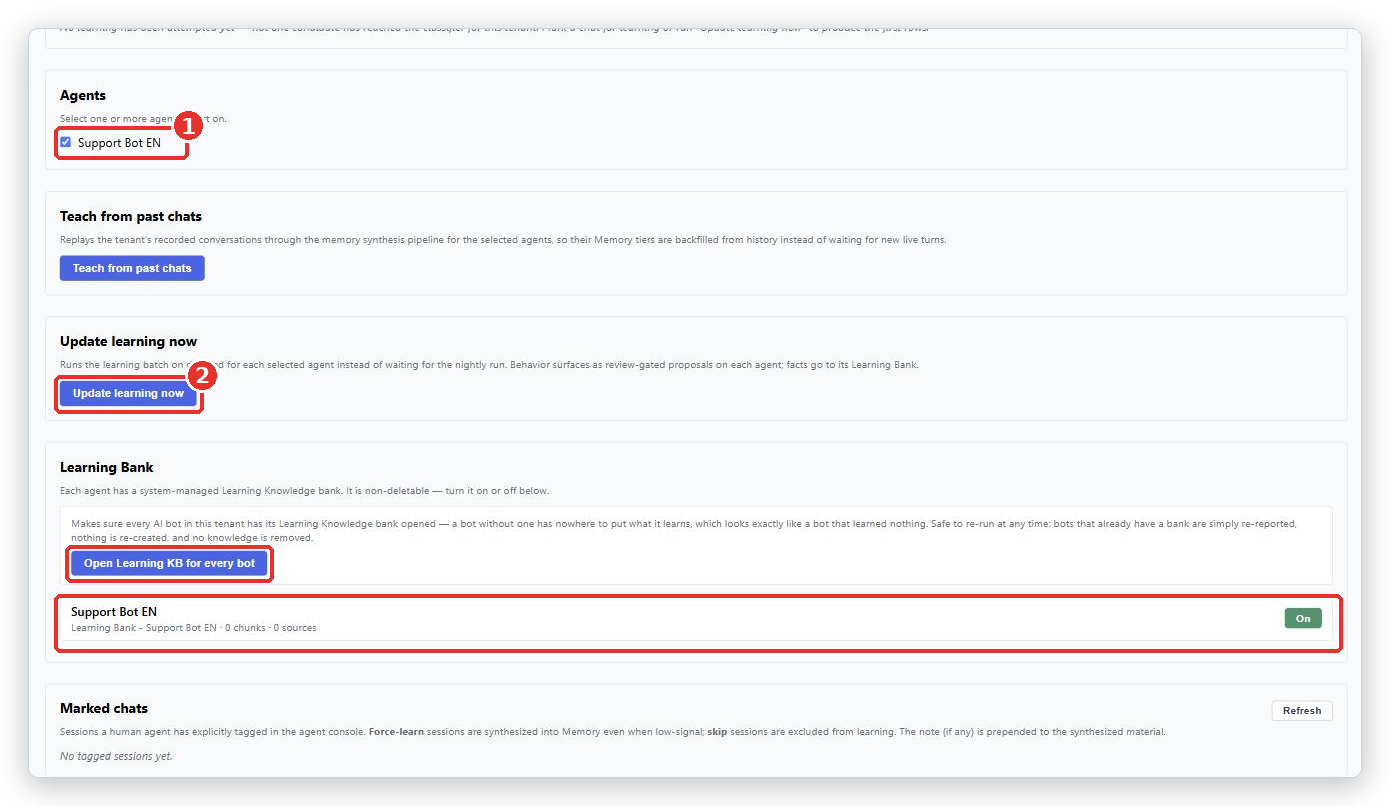
Those numbers only say how many were queued, not what was learned. The real result appears in Learning activity a little later.
Common problems
| Problem | What to do |
|---|---|
| No learning has been attempted yet - not one candidate has reached the classifier for this tenant. | Nothing has ever reached the system for your account. Learning is probably switched off. Ask your BotableX administrator. |
| Every row says Router off | Confirmed: Learning is switched off. Nothing was looked at. |
| Every loaded candidate was REJECTED | This is a real fault, not “nothing to learn”. Contact BotableX support with a screenshot of the reason column. |
A reason says bank_not_provisioned or bank_provision_failed |
That Agent has no Learning Bank. Press Open Learning KB for every bot. |
| Nothing new to learn - no high-priority memory was waiting for these agents. | Nothing was waiting. Use Teach from past chats, or mark a conversation as Always learn. |
| PARTIAL SUCCESS | Some Agents did not get a Learning Bank. Each failure is listed with its reason. Pressing again is safe. |
| The buttons are grayed out | Tick at least one Agent in the Agents section first. |
| I approved a suggestion but nothing changed | Approving is correct. Check the note now appears in Agent Brain or Tenant Mind, and that the wording is something the Bot can act on. |
Tip from the BotableX team. The fastest way to make Learning useful is to have your team use Edit myself on email replies instead of Approve & send when the reply is nearly right. Every edit is a lesson; every approval is not.