Learning and behavior
How to teach the Bot from past chats
You do not have to wait for new conversations for the Bot to improve. You can replay the ones you already have, and you can tell it which conversations matter.
Updated October 4, 2026. Applies to the BotableX Staff Portal. For tenant admins.
You do not have to wait for new conversations for the Bot to improve. You can replay the ones you already have, and you can tell it which conversations matter.
This article covers Teach from past chats and Marked chats.
Before you start
- You need the Learning permission (
learning.review). - Learning must be switched on for your account. If every row in Learning activity says Router off, or the list says no learning has been attempted, it is not.
- Nothing here changes the Bot’s behavior on its own. Behavior suggestions still wait for your approval.
So how do you teach an Agent from your old conversations?
This replays your recorded conversations through the learning system, so an Agent’s memory is filled in from history instead of waiting for new live messages.
- In the menu on the left, open Bot Management and click Learning.
- In the Agents section, tick the Agents you want to teach. The buttons below light up.
- Press Teach from past chats.
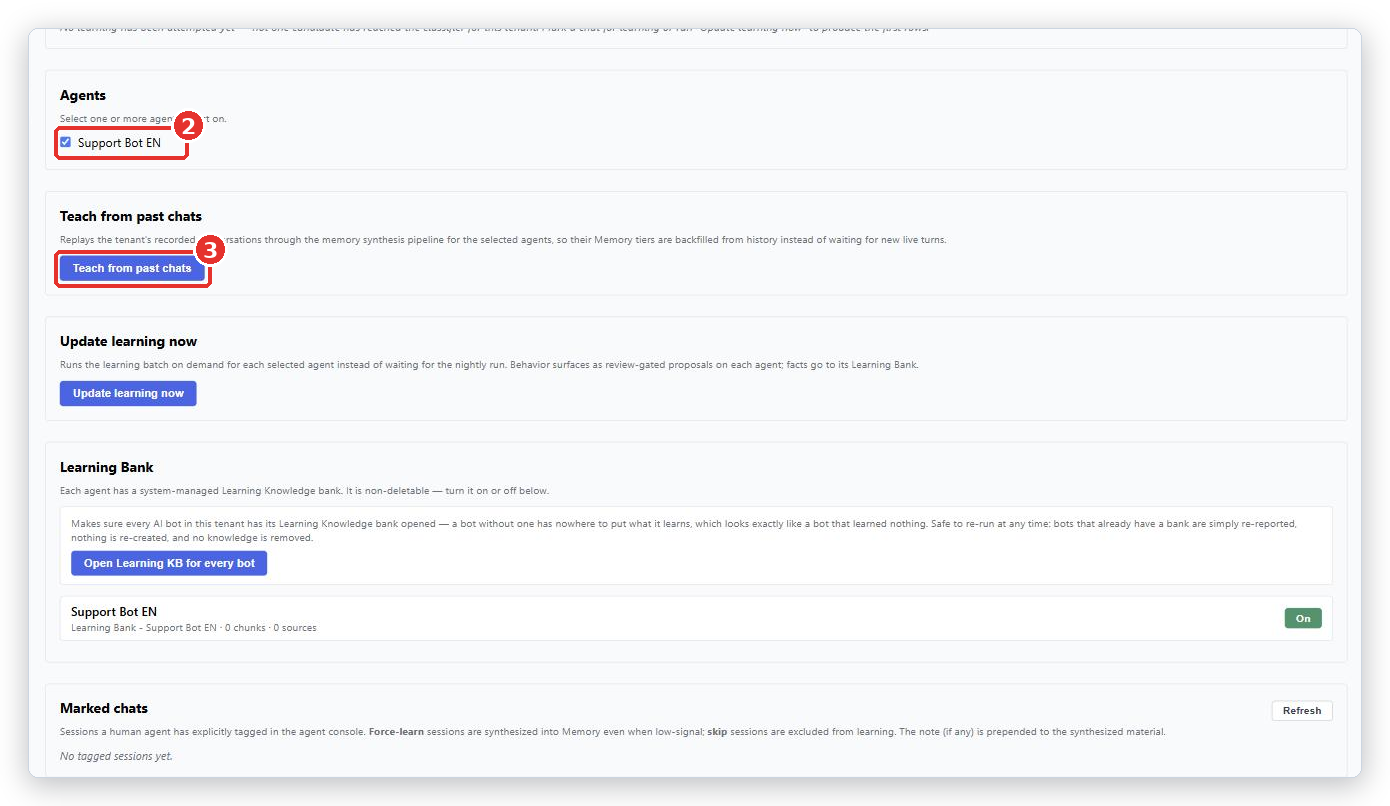
- Watch the progress line. It shows how many conversations were handled and how many notes were written.
This is the right thing to do when you have just set up a new Agent but have months of real conversations already.
Why some conversations are skipped
The progress line lists what was left out and why.
| Reason | What it means |
|---|---|
| could not be attributed to a bot | BotableX could not tell which Bot handled it. |
| belong to another bot | A different Bot handled it, so it is not this one’s to learn from. |
| marked “skip” | Someone tagged it Don’t learn. |
| already learned earlier | It was used in an earlier run. Nothing is learned twice. |
| failed while extracting | Something went wrong reading it. |
A lot of skipped conversations is normal. Short chats and ones with no real answer in them have nothing to teach.
Marking a conversation
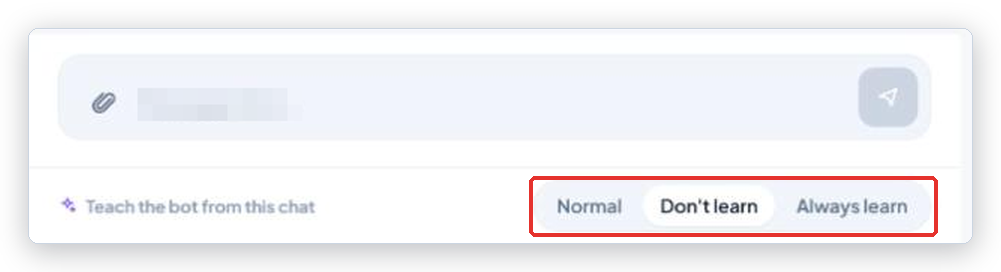
Your team can tag a conversation while they are in it, from the Agent Console or from Live Conversations. Look for Teach the bot from this chat.
| Choice | What it does |
|---|---|
| Normal | Let the Bot decide what is worth remembering. The default. |
| Don’t learn | Never learn from this conversation. Use it for anything unusual, sensitive, or handled badly. |
| Always learn | Always learn from this one, even if it looks unimportant. Use it for a conversation you would be happy to see repeated. |
The choice saves the moment you click it. There is no Save button and no note field in the console today.
Important. Set the tag before you close the conversation, so it is in place when Learning next looks at it.
Reviewing marked conversations
On the Learning page, the Marked chats section lists everything your team tagged. Each row shows the badge Always learn or Never learn, the end of the conversation id, your note, and when it was.
From there you can flip a tag with → Always learn or → Never learn, or press Clear to put it back to normal.
What happens next
Facts learned this way go straight into the Agent’s Learning Bank and are used immediately. Behavior lessons appear as suggestions on Bot’s Knowledge and wait for you. Check Learning activity to see which is which.
Common problems
| Problem | What to do |
|---|---|
| The button is grayed out | Tick at least one Agent in the Agents section first. |
| Everything was skipped | Read the reasons. If they all say belong to another bot, you ticked the wrong Agent. |
| Failed - … | Something went wrong part way. The run is safe to repeat, because nothing is learned twice. |
| Nothing appears in Learning activity afterwards | Learning is switched off for your account, or the Agent has no Learning Bank. Press Open Learning KB for every bot, then ask BotableX support to check the switches. |
| My team cannot see Teach the bot from this chat | It only appears on an open conversation. Once closed, it is locked. |
| The Bot learned something wrong from an old chat | Find the suggestion on Bot’s Knowledge and press Discard. Then tag that conversation Don’t learn so it is not used again. |
Tip from the BotableX team. Ask your team to tag five good conversations Always learn before you press Teach from past chats. Five conversations you chose beat five hundred the bot chose.