Knowledge Banks
How to let the Bot send images from a Knowledge Bank
The bot can attach a picture from your Knowledge Bank to its reply, for example a diagram from the help page it answered from.
Updated October 4, 2026. Applies to the BotableX Staff Portal. For tenant admins.
The bot can attach a picture from your Knowledge Bank to its reply, for example a diagram from the help page it answered from.
This is switched off by default and needs several things turned on, some by you and some by BotableX. This article explains the whole chain so you know what to ask for and what you can do yourself.
Before you start
- You need the Knowledge permission (
knowledge.manage). - Some of this is switched on by BotableX, not by you. Those steps say so.
- Nothing is ever sent to a customer until you deliberately open a bank for it. The safe default is that no picture leaves.
Why it is switched off by default
When BotableX reads your website it also collects the pictures on those pages. Some of those pictures were not made by you: stock photos, partner logos, images in adverts. Sending one of those to a customer as if it were your own answer would be wrong. So the default is that nothing is shared until a person looks at the gallery and decides.
The chain, from top to bottom
All of these must be true before a picture reaches a customer.
- Image collecting is switched on for your account. BotableX does this.
- You have looked at the gallery and pressed Index kept images. You do this.
- Image serving is switched on for your account. BotableX does this.
- The bot is allowed to attach pictures to replies. BotableX does this.
- Sending files is switched on for the Channel type, for example email or WhatsApp. BotableX does this.
- The bank is open for sharing: The bot may show this bank’s images to customers is ticked. You do this.
So: ask your BotableX administrator to turn on the four account-level switches, and do the two steps in the middle and at the end yourself.
So how do you open a bank for customer sharing?
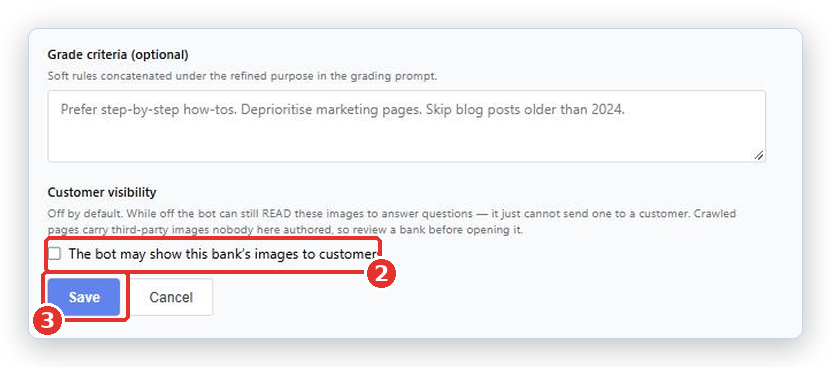
- In the menu on the left, click Knowledge Banks, then click Edit on the bank.
- Scroll to Customer visibility and tick The bot may show this bank’s images to customers.
- Click Save.
Important. Opening a bank that was filled by reading your website may release pictures nobody at your company made. Look through the Media tab first and delete anything that is not yours.
Reviewing and indexing images
- Open your Knowledge Bank and click the Media tab. Use the Source filter at the top to look at one file or page at a time.
- If images were collected from your website, a panel says how many are waiting to be indexed.
- Look through them. Delete anything you do not want: stock photos, adverts, other companies’ logos, decorations.
- Click Index kept images (N). Only what you kept is processed.
- Wait. They become Searchable as they finish. The page updates itself.
This two-step design is deliberate. Indexing only runs on what you keep, so deleting first saves work and keeps the gallery clean.
Controlling a single picture
On the Media tab each picture has a Customer delivery setting with three choices.
| Choice | What it means |
|---|---|
| Inherit from source/bank | Follow whatever the bank says. This is the normal setting. |
| Release to customers | Always allowed, even if the bank is closed. |
| Hold back | Never sent, even if the bank is open. |
You can also give each picture a Caption, mark one as Primary, and filter the gallery by status and by Min relevance.
What happens next
Once everything is on, the bot attaches a picture only when it is useful and only from the article it answered from. It sends at most one picture per reply in chat and on WhatsApp, and at most four in an email. It will not send the same picture twice in one conversation.
Common problems
| Problem | What to do |
|---|---|
| Image ingestion is switched off for this tenant, so nothing can be indexed. | Ask your BotableX administrator to turn image collecting on for your account. You cannot do this from the portal. |
| I can see pictures in the gallery but customers never get one | Either the bank is not open for sharing, or one of the account-level switches is off. Tick The bot may show this bank’s images to customers first, then ask BotableX support to check the rest. |
| Pictures from my website will not send even with the bank open | Set those individual pictures to Release to customers on the Media tab. Pictures collected by reading a website are held back on purpose. |
An uploaded image stays at processing on the Sources tab |
Describing images is one of the account-level switches. If it stays like that for more than a few minutes, ask BotableX support to check image processing is on for your account. |
| Not judged yet | The picture has not been scored for relevance yet. That is not the same as a score of zero. |
| Could not describe | The picture could not be understood. It may be a decoration, a blank image or an unusual format. Delete it. |
| The bot sends the wrong picture | Add a clear Caption to the right one, mark it Primary on its source, and delete confusing near-duplicates. |
Tip from the BotableX team. Upload your own diagrams as files (PNG or JPG) instead of relying on pictures found on your website. An uploaded image is yours, needs no review, and you can give it a clear Caption straight away.