Troubleshooting
The Bot says it does not know the answer
The Bot replies, but it says it is not sure, or it passes the conversation to a person when it should not have to.
Updated October 4, 2026. Applies to the BotableX Staff Portal. For tenant admins.
The Bot replies, but it says it is not sure, or it passes the conversation to a person when it should not have to.
This is a content problem almost every time. This article shows how to find out which content is missing and fix it.
Before you start
- You need the Knowledge permission (
knowledge.manage), and the Bots permission (bots.manage) to check the Agent. - Have one real example ready: the exact question a customer asked and the exact reply they got.
Why this happens
The Bot does not answer from memory. It searches your Knowledge Banks for pieces of content that match the question, and answers from what it finds. If it finds nothing close enough, it will not guess. It says so, or asks a person.
That is on purpose. A Bot that invents an answer costs you far more than a Bot that says it is not sure.
Check 1: is a Knowledge Bank connected?
- In the menu on the left, open Bot Management, click Bots, pick the Agents tab and click Edit on the Agent.
- Scroll to Connected Knowledge Banks.
- Check at least one bank is ticked, and that it is the right one.
A bank that exists but is not ticked is never read. This catches people out after they create a new bank and forget this step.
Check 2: does the bank actually contain the answer?
- Click Knowledge Banks in the menu and open the bank.
- Look at Knowledge entries in the header. If it is
0, nothing has been processed yet. - Click the Knowledge entries tab and look for the subject the customer asked about.
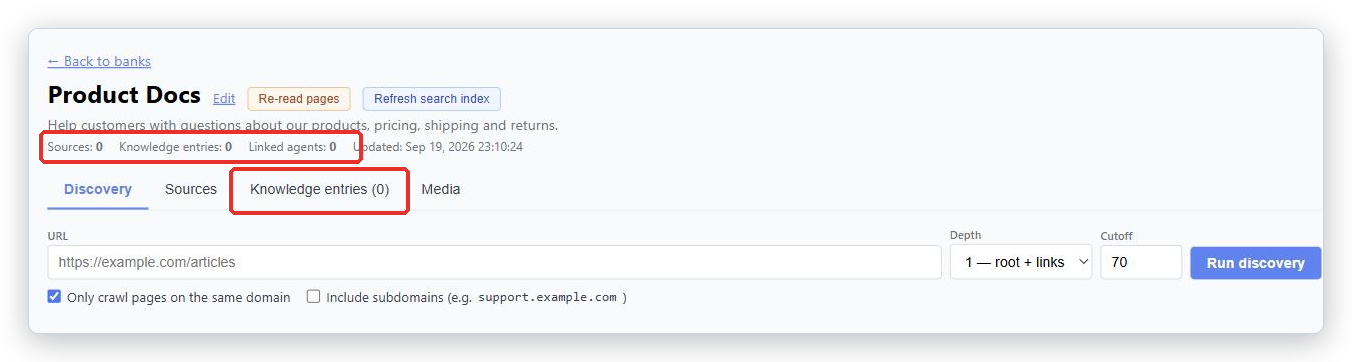
You will often find the answer is not there at all, only something close to it. Read a few entries. They are exactly what the Bot sees.
Check 3: is it worded the way customers ask?
This is the most common real cause. Your content says one thing and your customers say another. Your page says “fulfillment window”, your customer types “when will it arrive”.
- On the Knowledge entries tab, click Edit on the entry that should have answered.
- In Phrasings customers might use (one per line), add the way the customer actually asked. Add several wordings, including the clumsy ones and the misspellings.
- Add a few Search terms.
- Click Save.
This fixes more “it does not know” tickets than anything else you can do.
Check 4: write the answer by hand
If the answer simply is not in your content, add it directly.
- On the Knowledge entries tab, scroll to the bottom and click + Add entry.
- Write the answer in Answer text. Plain facts, one topic.
- Add several Phrasings customers might use.
- Click Save.
A manual entry works straight away. It is the quickest fix for a question that keeps coming up.
Check 5: is your content stale?
If the Bot gives an answer that used to be right, your website changed but the bank did not.
- Press Re-read pages at the top of the bank to read every web page again.
- For uploaded files, remove the old file and upload the new one. Files cannot be re-read, because the original is not kept.
If the Bot passes too many conversations to people
There is a setting called Response confidence threshold on the Agent page. It decides how sure the Bot must be before it answers directly. The default is 80 per cent.
Important. This setting is marked (system-wide, all AI agents). Changing it changes every AI Agent in your account. Lowering it makes the Bot answer more often and be wrong more often. Fix your content first, and only change this if you still need to.
If you cannot see the setting, your role does not allow changing it. Ask your BotableX administrator.
What not to do
- Do not paste facts into Agent Instruction. That field is for behavior. Facts belong in a Knowledge Bank, where they can be searched.
- Do not make one giant entry covering everything. It will match no question well.
- Do not add the same content to five banks. It does not make the Bot more sure, and you now have five copies to keep up to date.
Quick reference
| What you see | What to do |
|---|---|
| The Bot never uses a bank you just made | Tick it under Connected Knowledge Banks on the Agent. |
The bank shows 0 Knowledge entries |
Nothing has been processed. Check the Sources tab for failed or processing. |
| The answer exists but is never found | Add the customer’s real wording to Phrasings customers might use. |
| The answer does not exist anywhere | Write it as a manual entry with + Add entry. |
| The answer is out of date | Press Re-read pages, or re-upload the changed file. |
| Entries are full of menus and footers | Untick those pages on the Sources tab and use better ones. |
| The Bot is too cautious about everything | Fix content first. Only then consider Response confidence threshold, remembering it affects every Agent. |
| The Bot asks a clarifying question instead of answering | Often correct behavior: it will not claim something about the customer’s own situation that nobody established. |
Tip from the BotableX team. Keep a note of every question the bot could not answer this week. On Friday, write one manual entry for each, with the customer’s own words as phrasings. Ten minutes a week, and the “I don’t know” replies stop.