Troubleshooting
The Bot is not answering
Messages arrive and nothing comes back. This is the most common problem, and it is almost always one of six things.
Updated October 4, 2026. Applies to the BotableX Staff Portal. For tenant admins.
Messages arrive and nothing comes back. This is the most common problem, and it is almost always one of six things.
Work through this list in order. Each check takes less than a minute.
Before you start
- You need the Bots permission (
bots.manage). - Have the Channel name ready, and roughly when the last message that worked came in.
Check 1: is a Bot attached?
This is the cause about three times out of four.
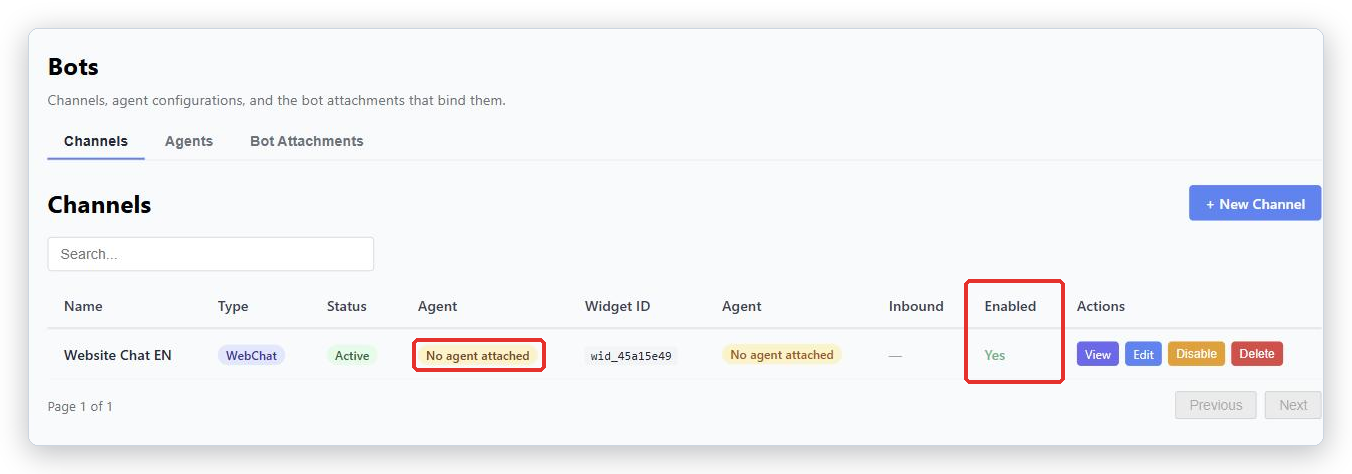
- In the menu on the left, open Bot Management, click Bots, and pick the Channels tab.
- Find your Channel and look at the Agent column.
- If it says No agent attached, that is your answer.
- Go to the Bot Attachments tab and find the row for this Channel.
- Look at Status.
Inactivedoes not count at all. Click Activate. - If there is no row for this Channel, create a Bot Attachment (see the related article).
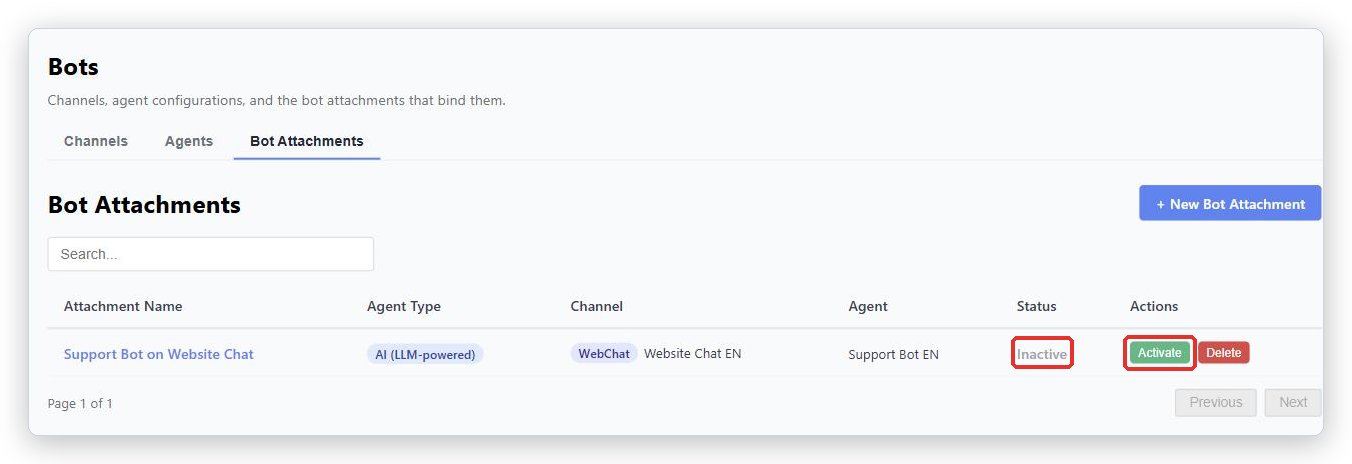
BotableX never picks a Bot for you when none is attached. It passes the conversation to a person instead. That is deliberate.
Check 2: is the Channel enabled?
- On the Channels tab, look at the Enabled column.
- If it says
No, click Enable in the Actions column. - Wait about 30 seconds and try again.
Also look at Status. If it says Suspended or Error, contact BotableX support.
Check 3: is it set to drafts only?
If the Channel shows the badge Drafts only, the Bot is writing every reply but never sending one. Everything is waiting in the Agent Console for a person.
- Open the Agent Console and look for Awaiting your review.
- If replies are sitting there, that is what is happening. Send them.
- To change it, open the Channel, set Who sends the reply to The bot answers (default), then press Save bot mode.
Check 4: for Email, is the mailbox being read?
- Open the Channel and look at the Inbound polling panel.
- Press Test Connection (inbound + outbound).
- If it fails, check the mailbox password has not changed and the account has not been locked.
For a Microsoft 365 mailbox, the sign-in may need renewing. Reconnect it from the Channel page.
Check 5: for WhatsApp, was Provision pressed?
Creating a WhatsApp Channel does not connect the number. Open the Channel, press Provision, then Check status, then Send a test WhatsApp message to your own phone.
Until Provision is pressed, no message reaches the Bot and nothing reports an error anywhere.
Check 6: for WebChat, is the window even loading?
- Open your website and check the chat bubble appears at all.
- If it does not, open the Channel and check your web address is listed under Approved domains, exactly, including
https://. - Check the two script tags are still on the page. Website changes sometimes remove them.
- Check the Tenant API key on the Channel page has been issued and was not revoked. If in doubt, issue a new one and give it to your developer.
If none of that is it
Contact BotableX support and tell them:
- the Channel name and type,
- the Agent name, if you know which one should be answering,
- roughly when it last worked,
- one example message and when it was sent,
- and what you already checked from this list.
That last line saves everyone a lot of time.
Quick reference
| What you see | Most likely cause |
|---|---|
| Badge No agent attached | No active Bot Attachment. Create one, or Activate the inactive one. |
Enabled says No |
The Channel is switched off. Enable it and wait 30 seconds. |
| Badge Drafts only | Replies are waiting in the Agent Console for a person. |
Status says Pending |
Not finished connecting. WhatsApp needs Provision; Email needs Test Connection. |
| WhatsApp silent, everything looks fine | Provision was never pressed. |
| Chat bubble missing from the website | Web address not under Approved domains, the script tags were removed, or the API key was never issued. |
| Email arrives, no reply goes out | Waiting for review in the Agent Console, or the outbound mailbox settings are wrong. |
| A message about no bot being attached reached a customer | Known defect. Create an active Bot Attachment and tell BotableX support. |
Tip from the BotableX team. Before you change anything, take a screenshot of the Channels tab and the Bot Attachments tab. If you end up talking to support, those two pictures answer half their questions.