Channels
What a Channel is
A Channel is a way for messages to reach you and for replies to go back out. Your website chat window is a Channel. So is a mailbox, a WhatsApp number or an SMS number.
Updated October 4, 2026. Applies to the BotableX Staff Portal. For tenant admins.
A Channel is a way for messages to reach you and for replies to go back out. Your website chat window is a Channel. So is a mailbox, a WhatsApp number or an SMS number.
This article explains the four kinds of Channel, what each one needs, and how to read the Channels list. Read it before you create your first Channel.
Before you start
- You need the Bots permission (
bots.manage) to see the Bots page. - Nothing here sends anything to a customer on its own. A Channel only answers once you attach a Bot to it with a Bot Attachment.
The four kinds of Channel
| Type | What it is and what it needs |
|---|---|
| WebChat | The chat window on your own website. BotableX gives you a Widget ID, an API key and two small pieces of code. Your web developer adds them to your site. See the WebChat article. |
| A mailbox customers write to. You either use an email provider such as Mailgun, connect your own mailbox over IMAP and SMTP, or connect a Microsoft 365 mailbox. | |
| Your own WhatsApp Business number, through a 360Dialog account. You need the API key from the 360Dialog hub and the phone number id from Meta. | |
| SMS | A Twilio phone number or Messaging Service. |
You can have as many Channels as you like, of any mix. Give each one a name you will recognize later, such as Website Chat EN or WhatsApp Support.
How to read the Channels list
Go to Bot Management → Bots and pick the Channels tab. Every Channel is one row.
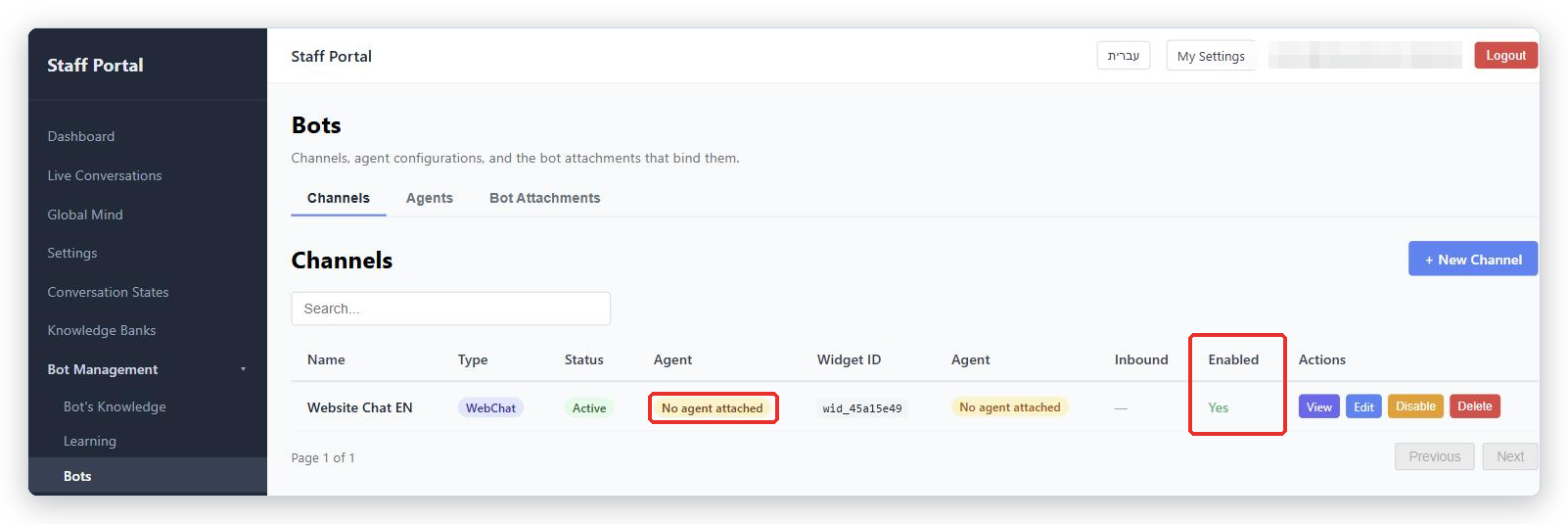
- Name is what you called it.
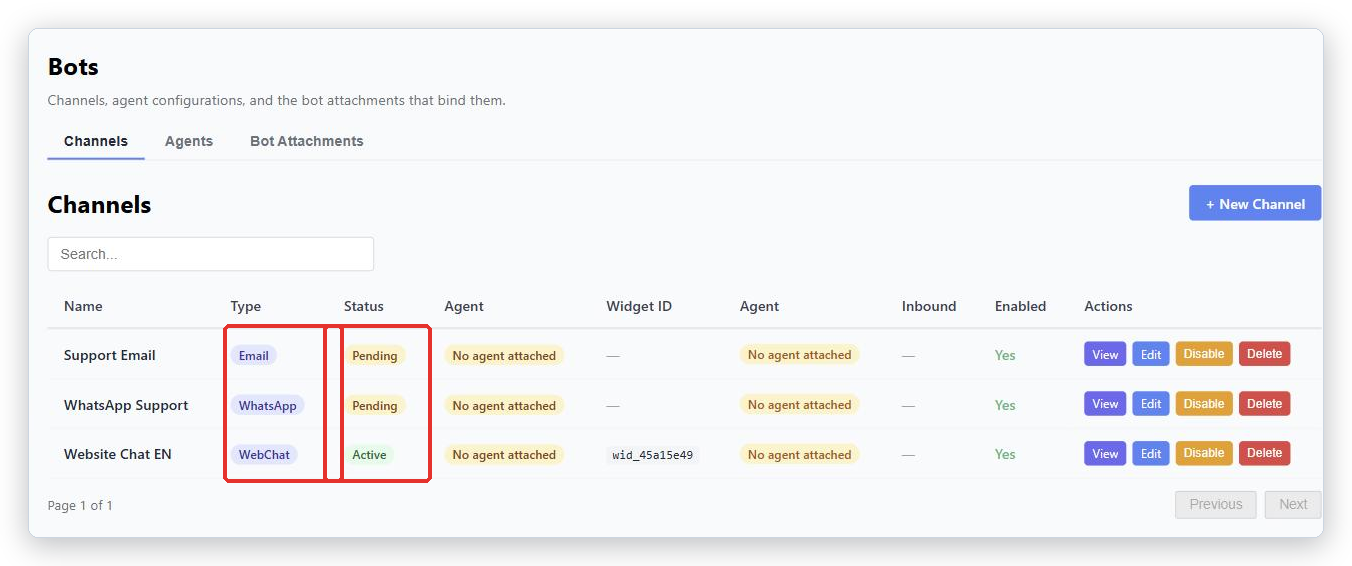
- Type is WebChat, Email, WhatsApp or SMS.
- Status is
Active,Pending,SuspendedorError. - Agent shows which Agent answers here. If it says No agent attached, nothing will answer on this Channel.
- Widget ID is only for WebChat. It identifies your chat window.
- Inbound is for Email only: whether BotableX is reading the mailbox.
- Enabled is
YesorNo.Nomeans the Channel is switched off. - Actions are View, Edit, Disable (or Enable), and Delete.
Two badges are worth knowing. No agent attached means you still need a Bot Attachment. Drafts only means the Channel is set so the bot writes every reply but never sends one; a person has to send it from the Agent Console.
What a Channel does not do
- A Channel does not decide what to say. That is the Agent.
- A Channel does not know your content. That is the Knowledge Banks.
- Creating a Channel does not connect it. For WhatsApp you must still press Provision. For Email you must still enter the mailbox details and test the connection. For WebChat your developer must still add the code to your website.
Common problems
| Problem | What to do |
|---|---|
| The list shows No agent attached | Create a Bot Attachment under Bots → Bot Attachments and make it active. Until then nothing answers. |
| The list shows Drafts only | The Email Channel is set to Consultation only - a person always sends. Replies wait in the Agent Console until a person sends them. Change it on the Channel page under Who sends the reply if that is not what you want. |
Status is Pending |
The Channel is saved but not fully connected. For WhatsApp, press Provision. For Email, run Test Connection. |
| I created a WhatsApp Channel and nothing arrives | Saving does not connect the number. Open the Channel and press Provision. Nothing reports an error until you do. |
| The Agent column appears twice | That is how the list looks today. Both columns show the same thing. |
Tip from the BotableX team. Name your Channels by where the customer is, not by what is behind them:
Website Chat EN,Support Mailbox,WhatsApp Sales. In a year, when you have six of them, you will thank yourself.