Agent Console
How to help the bot when it asks for advice
When the bot is not sure how to answer, it does not guess. It asks your team for advice and waits. The conversation moves to Bot needs help, and you can answer the bot in a private panel called Bot consultation....
Updated October 4, 2026. Applies to the BotableX Agent Console. For support agents.
When the bot is not sure how to answer, it does not guess. It asks your team for advice and waits. The conversation moves to Bot needs help, and you can answer the bot in a private panel called Bot consultation. The bot then writes the reply to the customer itself, in the customer’s language and tone.
This article shows how to spot a consultation, how to advise the bot, and how to tell it to carry on without you.
Before you start
- Advice you give the bot is not sent to the customer as written. The bot reads it, composes its own reply, and sends that. Write to the bot the way you would brief a new colleague.
- You can advise the bot at any time while it is handling a conversation, not only when it asks. The panel is always there unless you have taken over.
- If the consultation was routed to a teammate, you see the badge Assigned to another agent and the buttons are hidden for you.
How you know the bot needs help
- In the menu rail, the number on Conversations turns orange and counts the conversations waiting for advice.
- In the inbox, the conversation sits in the Bot needs help folder with the badge Bot needs help.
- On My Day, the Live activity feed says Bot requested help on
. - When you open the conversation, the console switches to the Bot consultation panel by itself and shows a small live dot on that tab.
So how do you advise the bot?
- Open the conversation from the Bot needs help folder.
- Above the messages, pick a layout: Tabs shows one panel at a time; Split shows the Customer chat and the Bot consultation side by side. Split is easier while you advise, because you can read the customer while you write.
- In the Bot consultation panel, read the bot’s question. It is marked Bot. The line The bot is asking for help on this conversation. Advise it below. confirms a consultation is open.
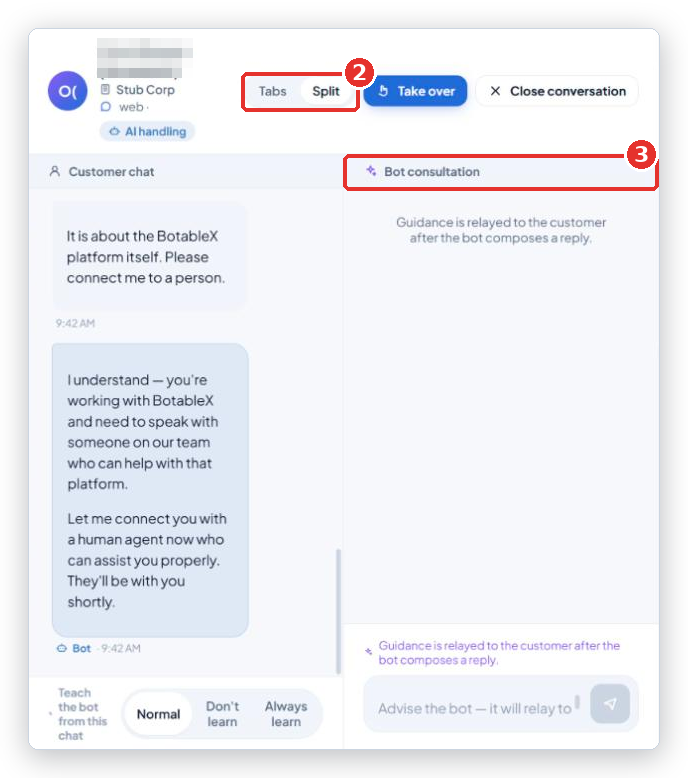
- In the box that says Advise the bot - it will relay to the customer…, type your advice. For example:
Refunds for orders over 30 days need a manager. Offer store credit instead. - Press Enter to send. Your advice appears in the consultation panel marked You.
- Watch the Customer chat panel. The bot composes a reply from your advice and sends it to the customer. The state goes back to AI handling.
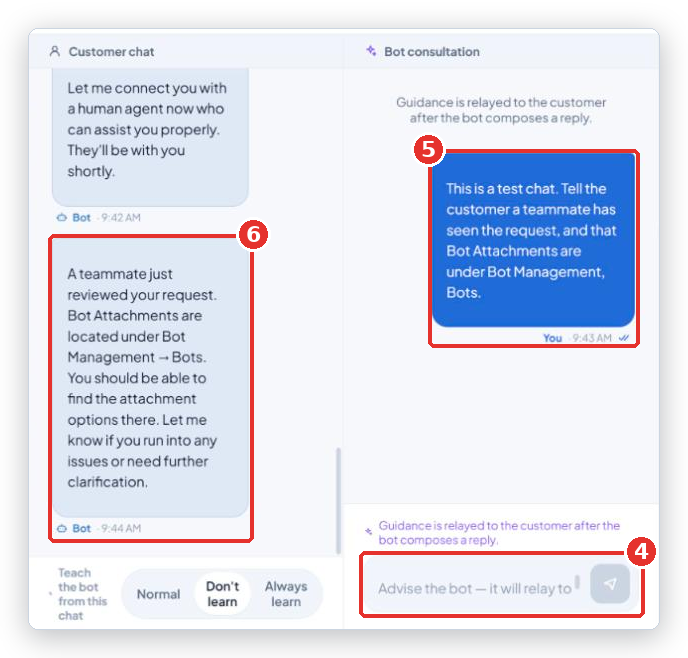
The hint under the box says it plainly: Guidance is relayed to the customer after the bot composes a reply. The bot does not copy your note word for word. Still, write it as if the customer might read it one day: no jokes about the customer, no internal codes.
Telling the bot to carry on without advice
Sometimes the bot asks about something it can handle on its own, or the customer has already moved on. Click Let bot continue in the header. The consultation closes without advice, the bot sends its own fallback reply, and the conversation goes back to AI handling. There is no “are you sure?” box.
Or answer the customer yourself
If the question needs a person, click Take over instead. You then write to the customer directly, and the bot stays quiet. See “How to take over a conversation and hand it back to the bot”.
Common problems
| Problem | What to do |
|---|---|
| The bot asked, but nobody answered for a while | The bot waits and the customer waits. Work the Bot needs help folder first every time you sit down. The Live Queue may also hold it if it needs a person and nobody has claimed it. |
| The bot’s reply does not match my advice | The bot rewrites advice in its own words and can leave things out. Add a second, shorter note in the Bot consultation panel, or Take over and answer yourself. |
| A red box in the consultation panel says the guidance was not delivered | Your advice did not reach the bot. Check the top bar says Live and send it again. |
| I do not see the advice box | You have taken over this conversation. The bot is quiet, so there is nothing to advise. Release to bot first if you want the bot back. |
| Let bot continue is missing | It only shows while a consultation is open, and never on a conversation that is Assigned to another agent. |
Tip from the BotableX team. Give the bot facts and a decision, not a script.
The order shipped on Monday, tracking is in the customer's email, offer a 10% coupon for the delaygets a better reply than a full sentence for the bot to copy.