Agent Console
How to tell the bot what to learn from a chat
BotableX Learning looks at finished conversations and picks out things the bot should remember. As an agent you can mark a conversation so Learning treats it differently: always learn from it, or never learn from it.
Updated October 4, 2026. Applies to the BotableX Agent Console. For support agents.
BotableX Learning looks at finished conversations and picks out things the bot should remember. As an agent you can mark a conversation so Learning treats it differently: always learn from it, or never learn from it.
This article shows the three-way switch under every conversation and when to use each setting.
Before you start
- Learning itself is switched on or off by your administrator in the Staff Portal. Your mark is kept either way, and it is used when the next learning run happens.
- What the bot learns lands as a suggestion under Bot’s Knowledge in the Staff Portal. An administrator approves or discards it there. Nothing you mark changes the bot on its own.
- The mark is per conversation and is saved the moment you click. You can change it as often as you like.
So how do you mark a conversation?
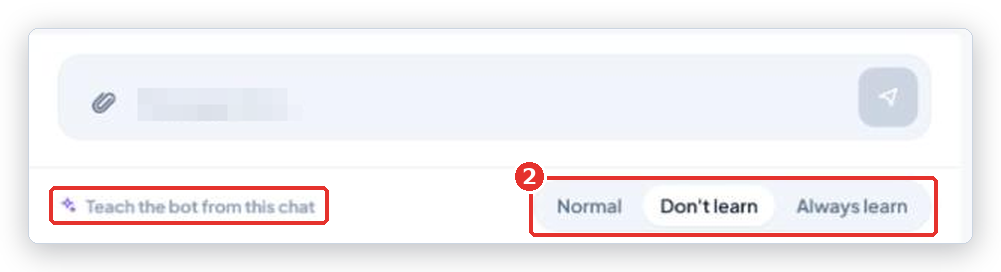
- Open the conversation. Look at the thin bar at the bottom of the Customer chat panel, titled Teach the bot from this chat.
- Click one of the three options: Normal, Don’t learn or Always learn. The choice saves at once; the buttons gray out for a moment while it does.
| Option | What it means |
|---|---|
| Normal | The default. Learning decides on its own whether this conversation has anything worth remembering. |
| Don’t learn | Skip this conversation completely. Use it for test chats, angry rants, or anything with details the bot should never repeat. |
| Always learn | Take this conversation into Learning even if it looks unimportant. Use it when you handled something the bot got wrong, so the fix is picked up. |
When to use Always learn
- You took over because the bot gave a wrong answer, and you gave the right one.
- You advised the bot in the Bot consultation panel and the customer was happy with the result.
- The customer explained something about your product or policy that the bot did not know.
When to use Don’t learn
- Test conversations and demos.
- A customer sharing personal data the bot should not keep.
- A one-off exception you made that must not become the rule.
What happens next
The next time Learning runs, marked conversations are handled as you asked. Anything it learns shows up as a suggestion in the Staff Portal under Bot Management → Bot’s Knowledge, where an administrator clicks Adopt or Dismiss. Marked conversations are also listed under Bot Management → Learning → Marked chats, so the administrator sees what the team flagged.
Common problems
| Problem | What to do |
|---|---|
| Failed to save. Please try again. | Connection problem. Check the top bar says Live and click the option again. |
| I marked Always learn but nothing changed in the bot | Learning runs on a schedule, and every suggestion needs an administrator to Adopt it. Ask your administrator to check Bot’s Knowledge. If Learning is switched off for your organization, nothing runs at all. |
| I cannot find the bar | It is at the very bottom of the Customer chat panel, under the messages and under the message box if you have taken over. In Split layout it is under the left panel. |
Tip from the BotableX team. Mark Always learn right after you fix something, while you remember why. Later, nobody will find that chat again among hundreds.